Call For Admission - 9644139972

Certify Course

IS0 9001:2008 Certifed Diploma Course .

Placement to Serivce Center

Placement by Asia Telecom in Big Reputed Company

All Mobile Stock Rom Data

we HAVE PROIVE ALL STOCK ROM DATA FOR ALL MOBILE PHONE

GET ADMISSION NOW CALL TO 9644139972

jABALPUR,MADHYA PRADESH.

How to Reset Mobile Phone Complete Guide

Hard Reset All Mobile Phone Complete Guide

Advance Mobile Repairing Hardware & Software Complete Guide
Showing posts with label reset. Show all posts

Friday, 2 June 2017

No Light Glow in Mobile Display


मोबाइल स्क्रीन में लाइट नहीं जलना  
No Light Glow in Mobile Display Screen Faults and Solution 

Wednesday, 31 May 2017

How to Factory Reset Android

How to Factory Reset Android Phone and Get Back up


Suppose our android device is not performing well, and we like to take action for Factory reset.
One of best option for taking fully Android phone backup can be performed through these apps –
  1. Titanium Backup Apps
  2.  Wondershare MobileGo to make a backup to your PC.
If we have done process of android backup then follow below tips to carry restore factory –
  • At first Open Phone Setting and click on Storage option in menu lists .

Note –
  • If our android mobile is old version then click on setting option and select Privacy.

  •  In next tab, go to at the bottom, click on factory data reset option.
  • Once we choose this option, Android will inform us that we are ready to complete clean information of internal phone memory. An option will also appear to remove complete information of internal phone memory and memory card. If our android mobile is plugged with internal memory card and do not like to format it then select  Skip option.

  • Now our Android phone will complete reset factory setting actions in few minutes and restart automatically.
Once Restore factory setting of android phone has performed then we can use personally it after new configuration or sell it to buyer quickly.

Master reset for Kepad Mobile

Master reset


On some mobile phones, usually the older basic phones, a Master Reset option was available in the settings and also perform by secret code.
keypad मोबाइल फ़ोन में मास्टर रीसेट करने के लिए फ़ोन की सेटिंग में आप्शन रहता है और सीक्रेट कोड के जरिये keypad मोबाइल को मास्टर रीसेट किया जाता है 

Master Clear

 This option can be found under the settings and resets the entire cell phone to like new condition and erases all user data and custom settings. 
मास्टर रीसेट करने से फ़ोन नए कंडीशन में आ जाता है फ़ोन में यूजर का डाटा डिलीट हो जाता है 

How To Reset Mobiles, Reset Codes

1.  Master Reset – Dial *#7380#  from Nokia handset.


A Master reset deletes all existing tasks and errors of internal memory. It will bring mobile in original mode. It needs confirmation of security code.

अगर  सीक्रेट कोड परफॉर्म करने के बाद सिक्यूरिटी कोड आता है तब फैक्ट्री default कोड 12345 का यूज़ कर करे |

Write factory default 12345 to confirm.


Caution
We should be taken all backup of internal phone memory before performing this actions.
Alternate shortcut code of hard reset –
  • Dislodge the battery of your mobile for the time period of 30 minutes. Insert again.
  • Hit these 3 keys on the mobile keypad successively – on/off+*+3.
  • Start your mobile by switching on.
  • But, some Nokia model handset is used to perform reset process through another mode.
  • Some more codes for Reset and information of your Nokia Mobile:


To Find EMEI*#06#
Soft Reset*#7780#
Hard Reset*#7370#
Make Display Crystal Clear*#67705646#
Find the version of the Software installed*#0000#
Situation of SIM Lock*#746025625#
Find Whether your SIM is restricted#pw+1234567890+1#
Details of the Bluetooth Gadget you have connected*#2820#
Activate EFR to improve the overall performance*#3370#
Activate HRC*#4720#
Deactivate HRC*#4720*
Follow the steps to find more details of your Nokia Mobile:
Press *#92702689#
  • If you need to know Serial Number of your mobile press 1.
  • To find Manufacturing time detail press 2.
  • If you want to know the buying date press 3.
  • If you want information of last repairing press 4.
  • If you are curious about from when is in the start mode press 5.

For Nokia 5800 model

If we press this shortcut (Green key + Red key+ Camera key+ on / off-key) all at once
Properly, the mobile phone will restart automatically.

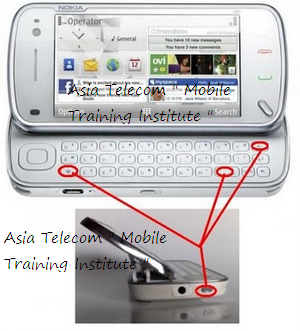
Nokia N 97 Reset code

Press Power key + Space key + Delete Key (left arrow logo) + caps / shift button (up arrow logo) at same time.


Nokia N8

At first, turn off mobile handset. Press and hold these keys at the same time.
Volume down Key + Camera Key + Menu Key + Press Power button until the phone vibrates.


Another useful Post:
  •  Samsung, Micromax Restore factory Setting Codes, 

Reset Codes of All Samsung Mobile Handsets

  • If we have forgotten Samsung mobile code, then don’t be worried. A useful reset code can be used to recover quickly.
  • At first, turn off mobile handset.
  • Now we have to remove the SIM from handset.
  • Switch on the mobile handset without SIM.
  • Insert the code – *2767*637#  (it is used to reset Mobile tracker code)
*2767*3855# – (it is used to reset all type of mobile code).

We can attempt to apply these codes in case of downloading java files, or media (video, MP3, Image) is not working properly.
  • *2767*JAVA# –  java Reset
  • *2767*MEDIA# – Reset Media (it will remove MP3 and pictures from internal memory)
  • *2767*WAP# – WAP Reset ( It will reset handset Internet setting)
  • *2767*CUST# – Reset Custom EEPROM ( resetting Internal Memory)
  • *2767*FULL# – Reset Full EEPROM ( Full format of internal memory)

 LG Handset Reset Code

For performing resetting factory operation in maximum LG handset,
dial this code –  2945#*#
or
Dial #PWE668 ( PWE = Power button of THE handset)

Android Phone Reset Codes

For an Android phone factory data reset

1. Press this code– *#*#7780#*#*

When we insert it, the next screen will ask to click on Reset phone option.
Caution
if we want to withdraw from this operation then click on cancel button.
This code is used to perform android factory reset completely. It will delete entire apps and phone settings such as –
  • Google account setting
  • Settings of software and phone
  • All downloaded apps

2. Press *2767*3855#

It is used to perform factory format and reinstall the phone firmware again. Now it will delete completely internal phone memory settings and data.
Caution
Once we insert this code, there is no option to avoid from format factory operations. So try to remove phone battery quickly to stop it.

Micromax Mobile Reset factory Code 

for all Micromax handset, press this code  – *#8929#
Micromax X313 handset – *#73738#
or 
A useful tip to perform Hard Reset to Micromax mobile –


Micromax X660 Handset Reset process – 

  • At first format your phone memory and then go to factory reset option inside the phone.
  • Type 0000 or 1234 then your phone will be formatted instantly.
  • Make ensuring that before performing actions of the phone format note your entire phone contact numbers or moved it in another SIM card.
Other Mobile Phone Master Code  - 4321

What is a Hard Reset?


Hard Reset


What is a Hard Reset?

A Hard Reset reverts a phone to its original settings and a clean OS (Operating System) removing all data and information added to the cell phone by the mobile phone user. In essence a Hard Reset erases everything from the phone and puts the phone back to like new condition as though it’s brand new right out of the box.
हार्ड रीसेट मोबाइल फ़ोन में यूजर का सारा डाटा डिलीट करके मोबाइल को उस के ओरिजिनल सेटिंग में ले आता है | हार्ड रीसेट करने के बाद मोबाइल ठीक नए कंडीशन में आ जाता है जैसे न्यू ब्रांड पैक से बहार निकला हो | 

How to perform a Hard Reset

The steps involved when trying to perform a Hard Resets are going to depend on what type of cell phone you have, what operating system is currently running on the mobile phone, the make and model of the phone, and what version of software is installed on the phone.
हार्ड रीसेट परफॉर्म करने के लिए उसके ऑपरेटिंग सिस्टम को जानना पड़ता है क्युकी हर मोबाइल के OS का हार्ड रीसेट के बटन अलग अलग होता है |

Not all phones are Hard Reset the same way.


For example Android phones have many different types of Hard Resets available depending on the make and model of the phone itself.
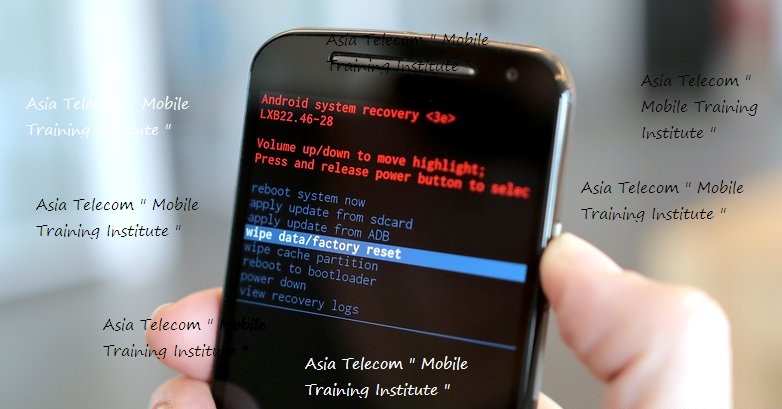
 Most Android phones can be Hard Reset by holding a certain key combination such as holding the volume down and power key for 15-20 seconds then releasing those keys and then using the volume keys to navigate and highlight the Hard Reset option then using the power key to make the selection. 
This comes in handy if you forget your password or have a serious software related issue that’s causing your touch screen to be non responsive.
जैसे की उपर बताया गया है | एंड्राइड फ़ोन में अलग अलग तरीके से हार्ड रीसेट पेर्फ्रोम किया जाता है 
कुछ फ़ोन में हार्ड रीसेट उस फ़ोन को ऑफ कर के फिर फ़ोन की पॉवर के और वॉल्यूम उप की को एक साथ 10-15 sec तक दबाते है फिर हार्ड रिकवरी मेनू में आके नेविगेट के जैसे वॉल्यूम उप & डाउन से रीसेट को परफॉर्म करते है  
If you want to learn more about Hard Resets on Android phones you can read How to Hard Reset an Android Phone for more information. 
मोबाइल फ़ोन में  हार्ड रीसेट कैसे हार्ड रीसेट कैसे करते है 
How to Android Phone Hard Reset  
How to Samsung Mobile Hard Reset 
How to Window Mobile Hard Reset 
How to Blackberry Mobile Hard Reset 

How to iPhone Mobile Hard Reset 

Don’t forget what a Hard Reset does

Remember that a Hard Reset erases all personal data from the mobile phone. Make sure to backup everything that you don’t want lost or deleted before performing the Hard Reset.
हार्ड रीसेट मोबाइल में यूजर के डाटा को पूरी तरह डिलीट कर देता है और फ़ोन को बापस नए जैसा बना देता है |
  

This is often the LAST resort in troubleshooting and a Hard Reset is a VERY POWERFUL tool that can solve most software related issues on a phone including but not limited to:

  • Fixing corrupted software.
  • Removing viruses
  • Fixing glitches
  • Reverting unwanted Settings
  • Removing bad applications
  • Removing anything that has been changed or added to the phone that can or is causing it to respond or act incorrectly (a Hard Reset removes everything but the OS).


Let’s start with the most common Hard Reset methods and go from there:

Note: the different types of methods are numbered, method 1, method 2, method 3, etc.
1. When the phone is powered off, press and hold the Volume Up and the Volume Down keys both at the same time, then press and hold the Power key until a test screen that shows some available options appears, usually takes about 15-20 seconds. When that screen pops up you can let go of the keys.


Once the Android Recovery screen appears release the Home key, then while on the Android Recovery screen, some time need to press the Volume Up and Volume Down keys both at the same time or some tome it appear automatically.than select Recovery if Menu Show.


Press the Volume Down key to navigate down through the options until it highlights FACTORY RESET then press the Power key to select it.


If/when you’re on the Android System Recovery screen release all the keys, and then use the Volume down key to navigate down to the “wipe date/factory reset” option. Once it’s highlighted press the Power key to select it.
Once you see the “Confirm wipe of all user data?” Press the Volume down key to highlight “Yes—delete all user data”, then press the Power key to select it.

Select Yes – delete all user data, and then select OK (again lower left).
Select “reboot system now” and press OK.


Asia Telecom " Mobile Training Institute " 
Get Admission Call - 9644139972
One Month - Full Hardware & Software 
Course Fees -7000/- Only
Address - Jabalpur, Madhya Pradesh 


Random Posts

banner
Copyright by Asia Telecom ,Created By Asia Telecom. Powered by Blogger.